

Vibe-Connect Creator Program

Make Your Live Room More Interactive.

VIP alerts, live goals, interactive features, and performance insights—all in one place. For desktop streamers using OBS Studio or SplitCam.

IF APPROVED, YOU'LL RECEIVE:
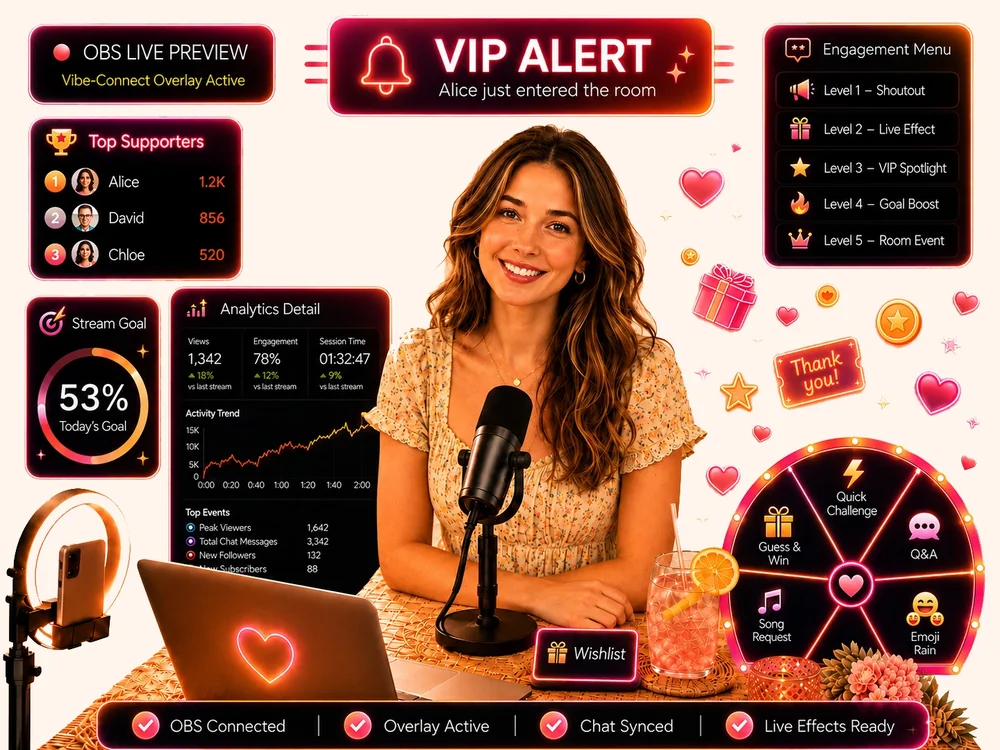
✓ Compatible device at no cost✓ Full software access✓ Standard shipping included✓ Setup support included
🛡️ No application fee⚡ Takes less than 1 minute18+ Creators aged 18+
Vibe-Connect live room preview
PROGRAM REQUIREMENTS

Who Is Eligible?

Please review the current program requirements before applying.

✅

Eligible if you are:

  • ✓18 years of age or older
  • ✓Have an active public live room on a supported platform
  • ✓Stream from a desktop computer
  • ✓Use OBS Studio or SplitCam
  • ✓Have an active creator profile we can review
❌

Not available for:

  • ✗Mobile-only streaming
  • ✗Social-media-only streaming
  • ✗Creators without an active public live room
WHY CREATORS CHOOSE VIBE-CONNECT

More Ways to Engage, Improve, and Grow

Vibe-Connect brings live room management, viewer interaction, and performance analytics together in one streamlined workflow, so you can focus on creating a better live experience.

Keep Your Room Lively

Give viewers more ways to interact with live effects, goals, supporter features, and interactive tools that make every stream feel more engaging.
Never Miss Your VIPs

Know when your top supporters arrive, recognize them instantly, and build stronger connections with the viewers who matter most.
See What Keeps Viewers Engaged

Track your live room performance, spot engagement trends, and discover which features keep your audience coming back.

Easy to Get Started

Start With the Workflow You Already Know.

Vibe-Connect is built for creators who already use OBS or SplitCam, with guided onboarding and support available from setup to go-live.

Familiar Workflow

Vibe-Connect works with a setup that already feels familiar, so there is no need to switch to an entirely different streaming system.

Free Device for Approved Creators

Approved creators can receive a compatible device at no extra cost, with shipping included.

Support From Setup to Go-Live

From software setup and device connection to pre-stream testing and troubleshooting, our support team is available 24/7 to help you get ready with confidence.

Platform Features

Everything your live room needs to stay active, interactive, and easier to manage.

Vibe-Connect brings together live room interaction tools, supporter recognition, setup support, and stream management features for creators using OBS Studio or SplitCam.

Live Room Interaction & Support

Give your audience more reasons to notice, participate, and stay connected during your stream.

Interactive LinkCreate access links for selected viewers to join supported interaction features during your livestream.
VIP Arrival AlertsGet notified when important viewers enter your room, so you can recognize them at the right moment.
Top SupportersHighlight your most active supporters and create more recognition inside your room.
Support GoalsSet visible room goals that give your audience a clear reason to participate and support your stream.
Creator WishlistAdd your wishlist link so supporters have another way to show love while your shipping details stay private.
Affiliate LinkShare your personal referral link and earn commission opportunities. Full commission details are shared with approved creators.

Engagement Tools

Create more live moments that make your room feel active, responsive, and fun to join.

Engagement MenuOrganize viewer actions, live moments, and supported interaction options in one simple menu.
Interactive SpinAdd a playful visual spin effect to create more active moments during your stream.
Task-Based InteractionsLet viewers unlock actions or reactions through interaction challenges during your stream.
Interaction AnimationMake interaction moments more visible, exciting, and easy for your audience to notice.

Stream Management & Setup

Keep your livestream easier to manage before and during each session.

Integrated ChatboxManage viewer messages in one place without switching between tabs mid-stream.
OBS / SplitCam SetupUse Vibe-Connect with your existing OBS Studio or SplitCam desktop streaming workflow.
Setup AssistanceGet step-by-step setup guidance, connection checks, and reminders before going live.
Multi-StreamingStream on multiple compatible platforms at the same time to reach more viewers.
Detailed AnalyticsTrack your performance and discover which features help create more participation during your streams.
How It Works

Test Vibe-Connect with support from day one.

From application to your first stream in four simple steps.

01Apply

Share your creator profile and main platform.

02Get approved

We confirm eligibility and next steps.

03Receive & set up

Get your device and guided onboarding.

04Go live

Test the tools with support available.

Transparency

What We Ask of Creators

We ask approved creators to install Vibe-Connect and use it with the provided compatible device during their live streams.

  • ✓No promotional content required
  • ✓No extra obligations beyond using the software
  • ⓘSeparate collaborations are discussed and agreed in advance
FAQ

Clear answers before you apply.

No hidden steps. Here is what creators usually want to know first.

Is there a fee to apply?

No. The application is free and takes less than one minute.

Who may receive a free device?

To be considered for a free compatible device, creators must stream from a desktop setup using OBS or SplitCam and be willing to install and test Vibe-Connect. Approved participants receive the device at no cost, with standard shipping included, subject to availability, regional eligibility, and the Creator Program Terms.

Do I need to create promotional content?

The Creator Program does not require any separate promotional content. Approved creators are invited to install Vibe-Connect and use it with the provided compatible device during their livestreams. Any additional content creation, promotion, or paid collaboration will be discussed and agreed upon in advance.

Do I need to rebuild my setup?

No. Vibe-Connect is designed to fit into a familiar OBS-based workflow.

What happens after I apply?

Our team reviews your profile and contacts eligible creators with next steps.

Why aren't social-media-only livestreamers currently eligible?

The current Vibe-Connect Creator Program is designed for creators who operate an active public live room from a computer. Vibe-Connect's engagement tools are built around room-based workflows, including viewer arrivals, supporter recognition, room goals, and interactive live events. TikTok Live, Instagram Live, YouTube Live, Facebook Live, etc. use different account, audience, and interaction systems, so social-media-only livestreaming is not included in the current program. You may still be eligible if you also operate an active public live room using OBS Studio or SplitCam.

Apply now

Apply for Creator Access

Share a few basic details below. Our team will review your creator profile and contact you with the next steps if approved.

✓ No payment required✓ Takes less than one minute✓ Private eligibility review

For eligibility review only. Not displayed publicly.

Submitting an application does not guarantee approval. Program benefits are subject to availability and the Creator Program terms. By applying, you confirm that you have reviewed our Privacy Policy and Terms.

Apply Now